Using Sentinel-2 images to monitor mouth of the river Syr Darya and Aral Lake and analyzing it with NDWI index on CODE-DE-Lab
Use Sentinel-2A Level-2A images from CODE-DE-Lab to compare water-related spectral patterns near the mouth of the Syr Darya river and Aral Lake in Kazakhstan, from May through July 2023. The example searches the OData catalogue and creates Normalized Difference Water Index (NDWI) rasters from green and near-infrared surface reflectance. NDWI does not measure water depth or volume, and the available acquisitions do not provide a daily record.
What is NDWI?
NDWI is a normalized difference index calculated based on the reflectance of light in two different spectral bands: green (G) and near-infrared (NIR). The formula for calculating NDWI is as follows:
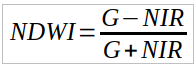
where:
G - reflectance in the green band,
NIR - reflectance in the near-infrared band.
NDWI values range from -1 to 1, where higher values indicate the presence of water, while the lower values may indicate other land cover types, such as vegetation or urban areas.
Advantages of using NDWI indicator
Raster images containing the NDWI indicator can be used in various fields, including:
- Water Resource Monitoring
Comparing water extent in lakes, rivers and reservoirs, including areas affected by drought or excessive rainfall.
- Crisis Management
Rapid identification of flooded areas during floods and assessment of damages.
- Environmental Protection
Monitoring wetlands and other aquatic ecosystems to preserve their biodiversity.
- Urban Planning
Analyzing the impact of urban development on nearby water resources.
- Agriculture
Assessing irrigation of agricultural fields and monitoring plant health.
What We Are Going To Cover
Define variables to hold the data
Work with OData API
Configure the OData endpoint
Create the OData query
Obtain products’ paths
Obtain NDWI
Functions for reading, calculating and saving raster data
Computing NDWI rasters
Analysis
Prerequisites
No. 1 Hosting and access to EODATA
You need a CODE-DE-Lab hosting account with access to https://identity.cloudferro.com/auth/realms/CODE-DE3/account/. Run the notebook where the catalogue product paths are readable under /eodata. Catalogue queries return metadata; they do not mount or download the imagery. For a Linux virtual machine, prepare the mount using How to mount eodata using s3fs in Linux on CODE-DE-Lab.
No. 2 Jupyter Notebook and Python packages
Prepare Jupyter Notebook using the official installation instructions. Install the following packages into the Python environment used by its kernel. Rasterio must have JPEG2000 support to read the Sentinel-2 bands.
python -m pip install requests numpy rasterio matplotlib
Download sentinel2_aral_lake.ipynb and open it in that environment. The notebook creates an aral_ndwi output directory in its working directory, which must be writable.
No. 3 Catalogue endpoint and product metadata
The OData query options are described in EOData Catalogue API Manual on CODE-DE-Lab. Use the endpoint shown below for CODE-DE-Lab. Check that the selected catalogue covers the Aral Lake area and May–July 2023. If the query returns no products, choose a region and period available on your platform; changing the catalogue endpoint alone does not provide access to its imagery. Processing requires the complete Level-2A SAFE product, including MTD_MSIL2A.xml, the 10 m B03 and B08 bands, and the 20 m scene classification layer (SCL). The Sentinel-2 processing documentation explains the reflectance offsets and quantification values read from this metadata.
import requests
Define variables to hold the data
Select the acquisition period and area around the Syr Darya river mouth and Aral Lake. The coordinates are defined through BBOX (Bounding Box), as a list of coordinates – Xmin, Ymin, Xmax, Ymax. All coordinates will be defined in EPSG:4326.
In python, we define three variables:
# Timerange of data that we want to recieve
start_date = '2023-05-01'
end_date = '2023-07-31'
# Geometry in form of a BBOX
bbox = [60.2347,46.1731,61.1160,46.6541]
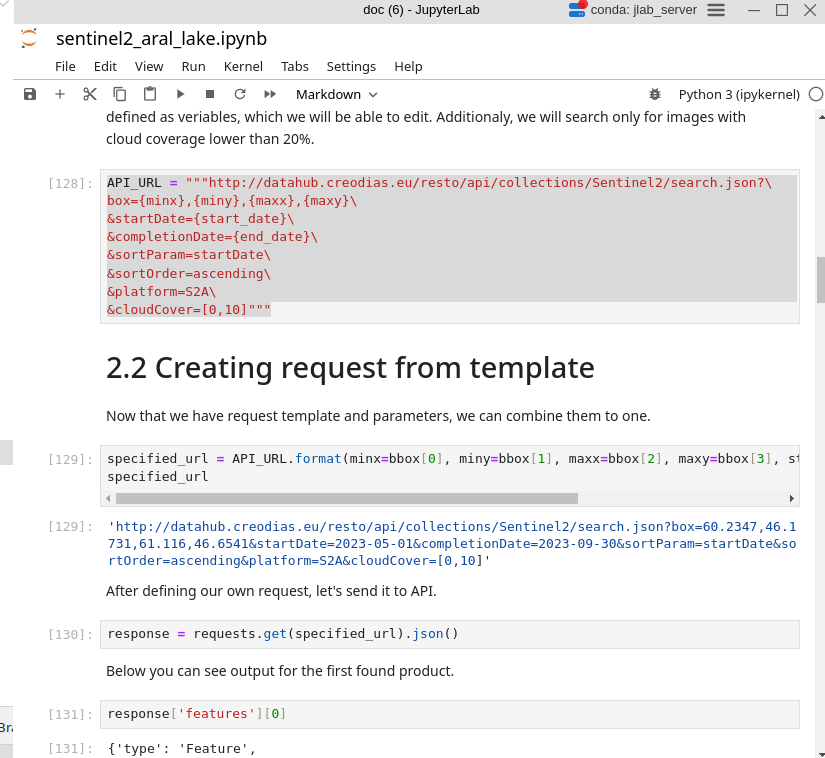
This how it will, typically, look at the Jupyter Notebooks of choice:
Work with the OData API
The OData API searches EODATA products using spatial and temporal filters. Its response contains each product path in the S3Path field. To process the imagery in the following steps, these paths must be accessible under /eodata in your environment.
Configure the OData endpoint
In the downloaded notebook, set ODATA_CATALOGUE_URL to https://catalogue.code-de.org/odata/v1.
ODATA_CATALOGUE_URL = "https://catalogue.code-de.org/odata/v1"
API_URL = ODATA_CATALOGUE_URL.rstrip("/") + "/Products"
Create the OData query
The query selects Sentinel-2A Level-2A products intersecting the bounding box from 1 May through 31 July 2023, with product cloud cover of at most 10 percent. Processing later crops each granule to the bounding box and applies a pixel-level quality mask. requests encodes the query parameters for the URL.
minx, miny, maxx, maxy = bbox
polygon = (
    f"POLYGON(({minx} {miny},{maxx} {miny},{maxx} {maxy},"
    f"{minx} {maxy},{minx} {miny}))"
)
query_params = {
    "$filter": (
        "Collection/Name eq 'SENTINEL-2' and startswith(Name,'S2A') and "
        "Attributes/OData.CSC.StringAttribute/any(att:att/Name eq 'productType' "
        "and att/OData.CSC.StringAttribute/Value eq 'S2MSI2A') and "
        "Attributes/OData.CSC.DoubleAttribute/any(att:att/Name eq 'cloudCover' "
        "and att/OData.CSC.DoubleAttribute/Value le 10) and "
        f"ContentDate/Start ge {start_date}T00:00:00.000Z and "
        f"ContentDate/Start le {end_date}T23:59:59.999Z and "
        f"OData.CSC.Intersects(area=geography'SRID=4326;{polygon}')"
    ),
    "$orderby": "ContentDate/Start asc",
    "$top": 1000,
    "$select": "Id,Name,S3Path",
}
specified_url = requests.Request("GET", API_URL, params=query_params).prepare().url
specified_url
Send the request and follow @odata.nextLink while further result pages are available:
products = []
next_url = specified_url
while next_url:
    response = requests.get(next_url, timeout=90)
    response.raise_for_status()
    page = response.json()
    products.extend(page["value"])
    next_url = page.get("@odata.nextLink")

if not products:
    raise RuntimeError("No Sentinel-2 Level-2A products matched this region and date range. Check catalogue coverage before changing the query parameters.")
Display the first product:
products[0]
Example of the returned fields:
{
  "Id": "49ec07df-edc5-4410-80ee-28312a787128",
  "Name": "S2A_MSIL2A_20230503T064621_N0510_R020_T40TGS_20240903T161656.SAFE",
  "S3Path": "/eodata/Sentinel-2/MSI/L2A_N0500/2023/05/03/S2A_MSIL2A_20230503T064621_N0510_R020_T40TGS_20240903T161656.SAFE"
}
Obtain product paths
Read the product paths from the S3Path field:
dataset = [product["S3Path"] for product in products]
dataset
Obtaining NDWI
Convert B03 and B08 digital numbers to surface reflectance before calculating NDWI. The per-band offsets introduced with Processing Baseline 04.00 do not cancel in the denominator of the index. Floating-point arithmetic also avoids integer overflow when adding or subtracting band values.
from pathlib import Path
import xml.etree.ElementTree as ET

import numpy as np
import rasterio
from rasterio.enums import Resampling
from rasterio.mask import mask
from rasterio.vrt import WarpedVRT
from rasterio.warp import transform_geom
Functions for reading, calculating and saving raster data
The functions below read the quantification value and B03/B08 offsets from MTD_MSIL2A.xml. They crop each granule to the bounding box and align the 20 m SCL layer with the 10 m bands using nearest-neighbour resampling. Only SCL classes 4, 5 and 6 (vegetation, bare soil and water) are retained. No-data pixels, negative reflectance and nonpositive denominators are excluded. Missing calibration metadata stops processing rather than silently using incorrect values.
def read_scaling(product_dir):
    metadata = product_dir / "MTD_MSIL2A.xml"
    root = ET.parse(metadata).getroot()
    elements = list(root.iter())

    def value(tag):
        return next(e.text for e in elements if e.tag.split("}")[-1] == tag)

    quantification = float(value("BOA_QUANTIFICATION_VALUE"))
    baseline = float(value("PROCESSING_BASELINE"))
    offsets = {
        e.attrib["band_id"]: float(e.text)
        for e in elements if e.tag.split("}")[-1] == "BOA_ADD_OFFSET"
    }
    # Sentinel-2 metadata numbers B03 and B08 as band IDs 2 and 7.
    if baseline < 4.0 and not offsets:
        offsets = {"2": 0.0, "7": 0.0}
    if not np.isfinite(quantification) or quantification <= 0:
        raise ValueError(f"Invalid reflectance quantification in {metadata}")
    if any(key not in offsets or not np.isfinite(offsets[key]) for key in ("2", "7")):
        raise ValueError(f"Missing or invalid B03/B08 offsets in {metadata}")
    return quantification, offsets


def find_band(granule, band, resolution):
    matches = sorted(granule.glob(f"IMG_DATA/R{resolution}m/*_{band}_{resolution}m.jp2"))
    if len(matches) != 1:
        raise ValueError(f"Expected one {band} file at {resolution} m in {granule}")
    return matches[0]


def process_granule(product_dir, granule, bbox, output_dir):
    quantification, offsets = read_scaling(product_dir)
    minx, miny, maxx, maxy = bbox
    geometry = {
        "type": "Polygon",
        "coordinates": [[[minx, miny], [maxx, miny], [maxx, maxy],
                         [minx, maxy], [minx, miny]]],
    }
    with (
        rasterio.open(find_band(granule, "B03", 10)) as green_src,
        rasterio.open(find_band(granule, "B08", 10)) as nir_src,
        rasterio.open(find_band(granule, "SCL", 20)) as scl_src,
    ):
        if green_src.crs is None or scl_src.crs is None:
            raise ValueError(f"Missing raster CRS in {granule}")
        if (green_src.crs != nir_src.crs or green_src.transform != nir_src.transform
                or green_src.shape != nir_src.shape):
            raise ValueError(f"B03 and B08 grids differ in {granule}")
        shape = transform_geom("EPSG:4326", green_src.crs, geometry)
        try:
            green_dn, transform = mask(green_src, [shape], crop=True, filled=False, indexes=1)
        except ValueError as exc:
            if "do not overlap" in str(exc):
                return None
            raise
        nir_dn, nir_transform = mask(nir_src, [shape], crop=True, filled=False, indexes=1)
        if transform != nir_transform or green_dn.shape != nir_dn.shape:
            raise ValueError(f"Cropped B03 and B08 grids differ in {granule}")
        # Resample the categorical 20 m SCL grid onto the 10 m band grid.
        with WarpedVRT(scl_src, crs=green_src.crs, transform=green_src.transform,
                       width=green_src.width, height=green_src.height,
                       resampling=Resampling.nearest) as scl_vrt:
            scl, _ = mask(scl_vrt, [shape], crop=True, filled=False, indexes=1)

        green = (green_dn.data.astype("float32") + offsets["2"]) / quantification
        nir = (nir_dn.data.astype("float32") + offsets["7"]) / quantification
        denominator = green + nir
        valid = (
            ~np.ma.getmaskarray(green_dn) & ~np.ma.getmaskarray(nir_dn)
            & ~np.ma.getmaskarray(scl)
            & (green_dn.data != 0) & (nir_dn.data != 0)
            & np.isin(scl.data, [4, 5, 6])  # vegetation, bare soil, water
            & np.isfinite(green) & np.isfinite(nir)
            & (green >= 0) & (nir >= 0) & (denominator > 0)
        )
        if not valid.any():
            return None
        ndwi = np.full(green.shape, -9999.0, dtype="float32")
        np.divide(green - nir, denominator, out=ndwi, where=valid)
        output = output_dir / f"{product_dir.stem}_{granule.name}_NDWI.tif"
        with rasterio.open(output, "w", driver="GTiff", height=ndwi.shape[0],
                           width=ndwi.shape[1], count=1, dtype="float32",
                           crs=green_src.crs, transform=transform,
                           nodata=-9999.0, compress="deflate") as dst:
            dst.write(ndwi, 1)
    return output
Computing NDWI rasters
Create the output directory and process each returned product. Granules outside the bounding box or without valid pixels are skipped. Each GeoTIFF retains its granule’s native projected grid and uses -9999 as its no-data value. Overlapping tiles are not mosaicked.
output_dir = Path.cwd() / "aral_ndwi"
output_dir.mkdir(parents=True, exist_ok=True)
outputs = []

for item in dict.fromkeys(dataset):
    product_dir = Path(item)
    if not product_dir.is_dir():
        raise FileNotFoundError(
            f"Product is not accessible: {product_dir}. "
            "Mount EODATA at /eodata in the environment running this notebook."
        )
    granules = sorted(p for p in (product_dir / "GRANULE").iterdir() if p.is_dir())
    if not granules:
        raise ValueError(f"No granules found in {product_dir}")
    for granule in granules:
        output = process_granule(product_dir, granule, bbox, output_dir)
        if output is not None:
            outputs.append(output)
            print(output)

if not outputs:
    raise RuntimeError("No valid pixels remain inside the bounding box after masking.")
Display the first generated raster with a fixed NDWI colour scale. Masked pixels are transparent. Select another entry in outputs to inspect a different raster.
import matplotlib.pyplot as plt
from rasterio.plot import plotting_extent

with rasterio.open(outputs[0]) as src:
    ndwi = src.read(1, masked=True)
    fig, ax = plt.subplots(figsize=(10, 6))
    image = ax.imshow(ndwi, extent=plotting_extent(src), cmap="RdYlBu",
                      vmin=-1, vmax=1)
    ax.set_title(outputs[0].name)
    ax.set_xlabel(f"Easting ({src.crs})")
    ax.set_ylabel(f"Northing ({src.crs})")
    fig.colorbar(image, ax=ax, label="NDWI")
    plt.show()
Analysis
The comparison below is retained from the earlier workflow for May, June and July 2023. It has not been regenerated with the corrected reflectance conversion and quality mask.
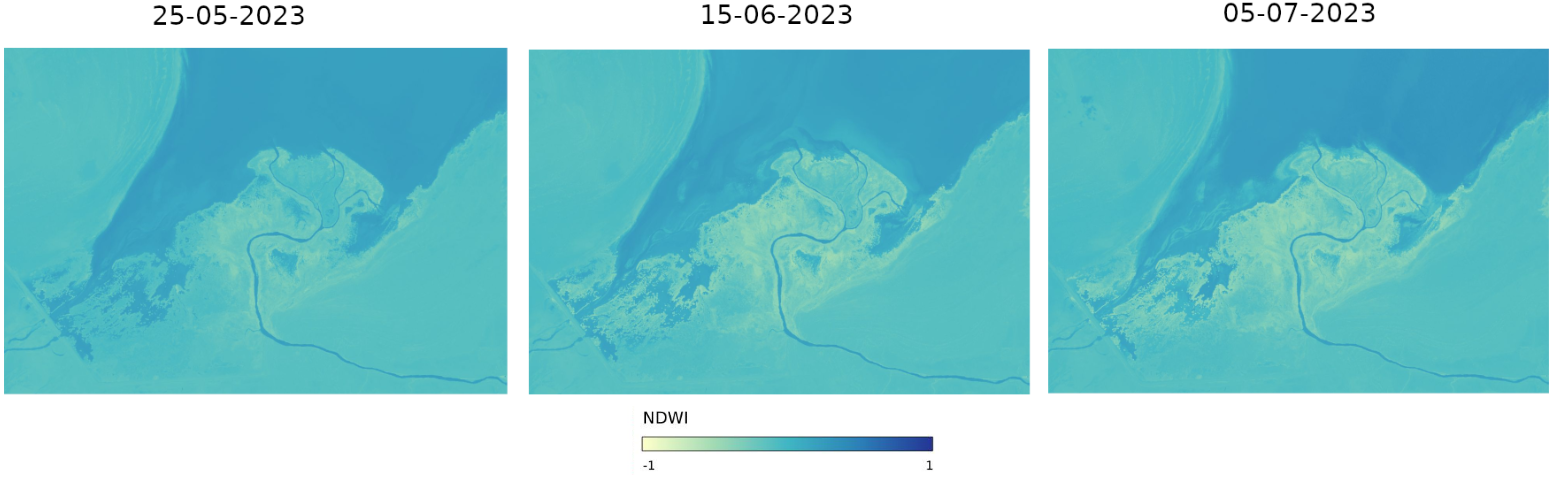
Historical illustration from the earlier processing workflow.
Use newly generated rasters to assess the selected acquisitions. Higher NDWI can indicate water, but a threshold alone does not establish water depth, volume or the cause of a change. Cloud masking and coverage differ between acquisitions, and the outputs are separate granules rather than a daily or monthly composite. Compare matching areas with valid observations before drawing conclusions about water extent.
What to do next
Interested to see additional examples of studying nature via satellite images?
Urban sprawl:
Floods:
Analyzing and monitoring floods using Python and Sentinel-2 satellite imagery on CODE-DE-Lab
Polluted air:
Processing Sentinel-5P data on air pollution using Jupyter Notebook on CODE-DE-Lab