How to mount the FORCE community collection as an NFS share on CODE-DE-Lab
In order to improve performance in accessing the FORCE community collection, a dedicated NFS server has been set up within the Cloud and is now available for all virtual machines. If you want to get access, your virtual machine needs to be connected to the dlr-access-net network interface.
The FORCE NFS server is accessible within the Cloud
under nfs.force.code-de.org or
under the corresponding IP address: 10.210.48.205
The following directories are available on the NFS FORCE server:
Export list for nfs.force.code-de.org:
/exports/FORCE-C1-L2 (everyone)
Mount FORCE NFS share on Windows
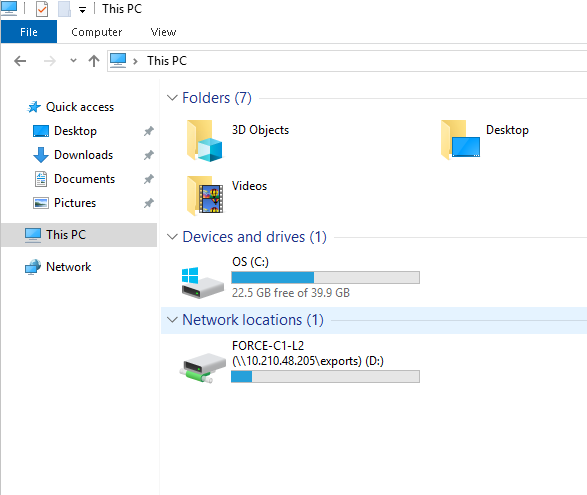
Open File Explorer and select ‘This PC’.
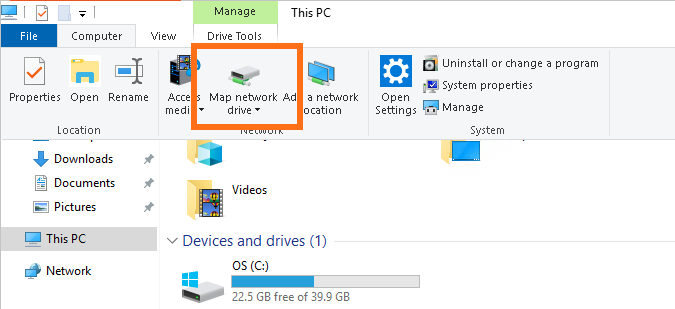
On the Computer Tab select Map network drive
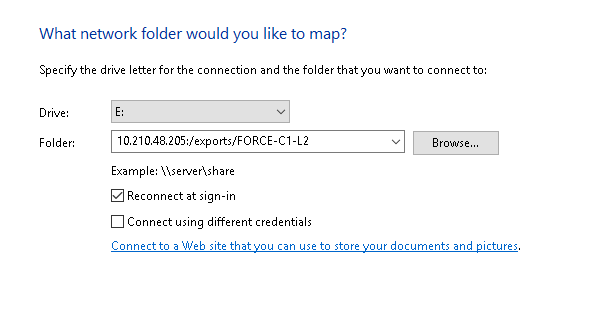
Choose the drive letter under which you want to mount the shared directory in the ‘Drive:’ drop-down menu and write the following command into the ‘Folder’ textfield:
10.210.48.205:/exports/FORCE-C1-L2
Then click Finish.
The FORCE community collection is now mounted: