Default Magnum cluster templates on CODE-DE
Default Magnum cluster templates define standard configurations for provisioning Kubernetes clusters.
Warning
Template availability is volatile. The set of templates, supported Kubernetes versions, and template features (for example provisioning driver, localstorage, cilium, dualstack) can change over time. Always treat the template list shown in Horizon (or returned by the CLI) as the authoritative source.
What we are going to cover
Prerequisites
1. Account
You need a CODE-DE hosting account with Horizon access: https://cloud.fra1-1.cloudferro.com/auth/login/?next=/.
2. Familiarity with OpenStack Commands
Ensure you have the relevant OpenStack commands installed:
How To Install OpenStack and Magnum Clients for Command Line Interface to CODE-DE Horizon
Available cluster templates
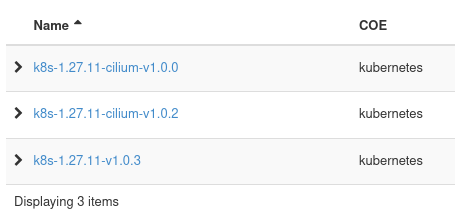
See templates in Horizon
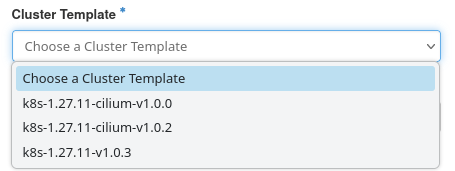
You select the cluster template during cluster creation, as described in How to Create a Kubernetes Cluster Using CODE-DE OpenStack Magnum.
There are two different places from which you can view the available cluster templates in Horizon:
Project → Container Infra → Cluster Templates
Project → Container Infra → Clusters → Create Cluster → Cluster Template
The list of templates is defined by the current site. You should treat the list shown in Horizon as authoritative.
See templates with CLI
With CLI, use How To Use Command Line Interface for Kubernetes Clusters On CODE-DE OpenStack Magnum.
To list available templates, run:
openstack coe cluster template list
Example output:

Important
If the CLI command returns “The service catalog is empty” but Horizon shows templates, re-source the correct OpenRC file or application-credential script and verify you are using the intended project.
Suffix meanings at a glance
Suffix |
Meaning |
|---|---|
localstorage |
Intended for NVMe-backed master nodes (localstorage flavors). |
cilium |
Uses the Cilium CNI instead of default Calico. |
vgpu |
Provisions a vGPU-first cluster (not recommended; add a vGPU node pool later). |
dualstack |
IPv4/IPv6 dualstack networking enabled. |
numbers / extra chars |
Internal use only — can be ignored. |
Basic capabilities of a cluster template
A Magnum cluster template defines the baseline capabilities of the cluster you are about to create.
When you look at a template in Horizon (or when you list templates with CLI), focus on these capabilities:
Kubernetes version
The template provisions a specific Kubernetes version (usually shown in the template name). For example, template version k8s-1.25 provisions Kubernetes 1.25 and k8s-v1.29 provisions Kubernetes 1.29.
For more information on Kubernetes upstream version skew policy, see https://kubernetes.io/releases/version-skew-policy/
Provisioning driver
- Heat driver
These clusters are not upgradeable through Magnum. The template is fixed at creation time. The version numbers for Heat based templates are all version numbers up to 1.27.
Note
For new clusters, always use the latest version of cluster templates.
Also, the list of available templates will change in time; new versions may be added and the older ones may be made deprecated.
Network plugins for Kubernetes clusters
Kubernetes cluster templates at CODE-DE cloud use calico or cilium plugins for controlling network traffic. Both are CNI compliant.
Calico (the default)
Calico uses BGP protocol to move network packets towards IP addresses of the pods. Calico can be faster then its competitors but its most remarkable feature is support for network policies. With those, you can define which pods can send and receive traffic and also manage the security of the network.
Calico can apply policies to multiple types of endpoints such as pods, virtual machines and host interfaces. It also supports cryptographics identity. Calico policies can be used on its own or together with the Kubernetes network policies.
Cilium
Cilium is drawing its power from a technology called eBPF. It exposes programmable hooks to the network stack in Linux kernel. eBPF uses those hooks to reprogram Linux runtime behaviour without any loss of speed or safety. There also is no need to recompile Linux kernel in order to become aware of events in Kubernetes clusters. In essence, eBPF enables Linux to watch over Kubernetes and react appropriately.
With Cilium, the relationships amongst various cluster parts are as follows:
pods in the cluster (as well as the Cilium driver itself) are using eBPF instead of using Linux kernel directly,
kubelet uses Cilium driver through the CNI compliance and
the Cilium driver implements network policy, services and load balancing, flow and policy logging, as well as computing various metrics.
Using Cilium especially makes sense if you require fine-grained security controls or need to reduce latency in large Kubernetes clusters.
How to decide which template to use?
Choosing the right template depends on the Kubernetes version and the features you need. Use this path:
Pick Kubernetes version (newest available for production, older for compatibility).
Check storage needs (do you need localstorage / NVMe masters?).
Pick network driver (Calico or Cilium).
Check for special features (for example dualstack). Avoid deprecated vGPU-first templates.
Limitations of changing templates
Once a cluster is created, you cannot change its template directly.
- Heat-based clusters
With Heat-based provisioners, the template is fixed at creation time.
To change Kubernetes version or behavior, create a new cluster with the desired template and migrate workloads manually. One approach for migration is to use a Velero backup, as described in Backup of Kubernetes Cluster using Velero