Services
Use Active services in the CODE-DE-Lab Dashboard to review provisioned resources and their billing assignments. The page shows which project, product, wallet or contract, and billing mode are associated with each resource.
Note
The Dashboard uses the term service at two different levels:
Service Catalog lists the high-level platform services enabled for the organization. In the current CODE-DE-Lab Dashboard, these are OpenStack and Private Object Storage.
Active services provides a billing inventory of the products and individual resources provisioned under those catalog services, together with their wallet, contract, and billing-mode assignments.
For example, OpenStack is a catalog service, hmaw.medium is a billable product within OpenStack, and WinSrv is an individual virtual machine using that product. Billing Reports shows the usage and costs generated by such products and resources over a selected date range.
Prerequisites
No. 1 Active account and Dashboard access
Service information is available in the CODE-DE-Lab Dashboard at https://tenant-manager.code-de.org. If the account has not yet been created and activated, follow Registration and Setting up an Account, then sign in before opening Active services.
No. 2 Provisioned service or resource
The Active services page lists services that have already been assigned to a project or organization. If the required service has not yet been allocated, submit Submitting Resource Applications on CODE-DE-Lab and wait for provisioning; otherwise, have the relevant project or product name ready for the page filters.
Review active services
Sign in to the Dashboard at https://tenant-manager.code-de.org. Under Services in the navigation menu, select Active services.
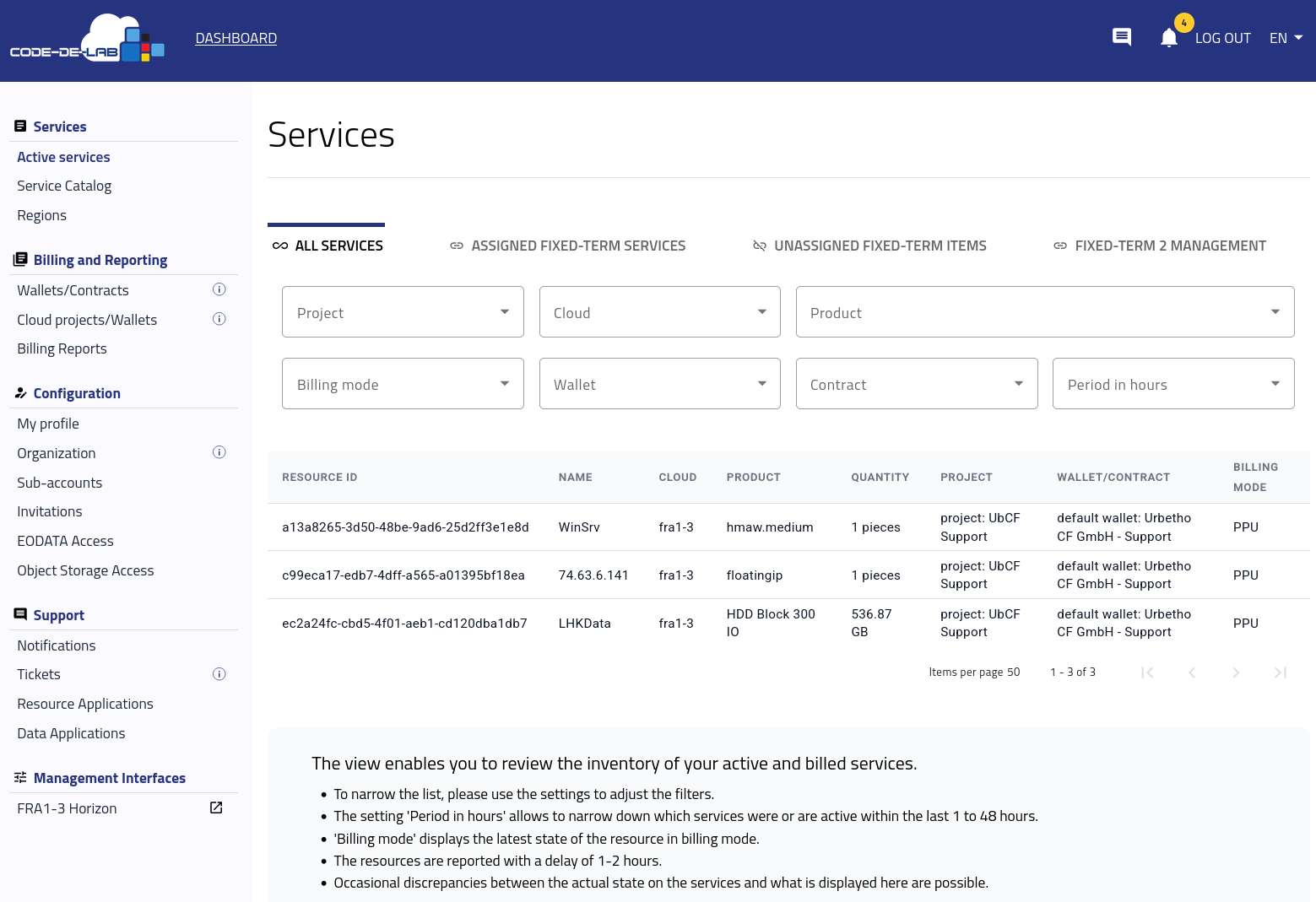
Active services and their billing assignments.
The All services view provides an inventory of active and billed services. Adjust the filters to narrow the list:
Project, Cloud, and Product identify where the resource is provisioned and its product type.
Billing mode displays the resource’s latest billing state.
Wallet and Contract identify the assigned billing source.
Period in hours limits the results to services that were active during the selected period, from the last 1 hour up to the last 48 hours.
For each result, the table shows the resource ID and name, cloud, product, quantity, project, assigned wallet or contract, and billing mode.
Note
Resources are reported with a delay of 1–2 hours. Occasional discrepancies between the current state of a service and the information displayed on the Active services page are therefore possible.
Fixed Term views
The Dashboard also provides the following views for Fixed Term services:
ASSIGNED FIXED-TERM SERVICES lists Fixed Term services that already have an assignment.
UNASSIGNED FIXED-TERM ITEMS lists Fixed Term items that have not yet been assigned.
FIXED-TERM 2 MANAGEMENT provides the management view for Fixed Term 2 assignments.
The entries available in these views depend on the Fixed Term arrangements associated with the organization.
Change a billing assignment
Use Active services to identify the current billing assignment, then change it according to the billing mode:
Filter the list by Project and, if necessary, Product to locate the relevant resource.
Note the values in the Wallet/Contract and Billing mode columns.
For Pay Per Use (PPU) or Pay As You Go (PAYG) billing, continue as an organization administrator and select Cloud projects/Wallets under Billing and Reporting.
Locate the project, open its three-dots menu, and select Change current wallet or Change next wallet:
Use Change current wallet to replace the active billing source.
Use Change next wallet to schedule the billing source that should take effect next.
For a Fixed Term assignment, contact Help desk and support. Fixed Term services are assigned by Support during contract creation.
Return to Active services after the update has been processed and confirm the new value in Wallet/Contract and Billing mode.
What to do next
For detailed information about current and next wallet assignments, follow Accounts and Projects Management on CODE-DE-Lab. The available billing modes and wallet operations are described in Wallets and Contracts Management.
After the service begins generating usage, use Billing reports on CODE-DE-Lab to review costs by product or individual resource.